About Me
Hey, I'm Lijian Liu, a senior software development manager at Walmart Global Tech.
I've enjoyed coding since I was 11. When playing Lode Runner (警察抓小偷) on an Apple II, slow floppy-disk loading led me to write my first device driver in 6502 assembly, using a 128KB RAM card to load the game into memory. That experience sparked my long-term passion for low-level system programming.
At Amazon, I built the Atocha logging solution entirely by myself. I worked extremely long hours, and the system became a major success for Alexa. Hundreds—possibly thousands—of Alexa developers benefited from this high-performance logging system. For this work, I received the Amazon "Just Do It" Award in 2017. I later moved to AWS, where I led the ElasticSearch storage team and significantly shortened the release cycle.
After that, I joined Walmart Global Tech, working on systems that process millions of user telemetry beacons per second.
Currently, I'm re-studying AI to keep up with rapid technological advances. Despite not having a strong formal math background, modern tools and online courses are helping me make steady progress. On this page, I share my ongoing learning journey.
AI Study Progress
visual-linear-algebra-for-ai
Visualize core linear algebra operations used in neural networks and LLM transformers.
Linear Algebra
Micrograd

The spelled-out intro to neural networks and backpropagation: building micrograd
by Andrej Karpathy
- Derivative Plotter (Dec 29, 2025)
- Micrograd Backpropagation Demo (Dec 30, 2025)
- Micrograd Neural Network Training Demo (Dec 30, 2025)
- Micrograd MLP(3, [4, 4, 1]) Neural Network DAG (Dec 31, 2025)
Makemore

The spelled-out intro to language modeling: building makemore
by Andrej Karpathy
Andrej Karpathy introduces the fundamentals of language modeling by implementing a character-level bigram model using the traditional statistical frequency-counting approach, before demonstrating how a simple neural network trained via gradient descent arrives at the identical probabilistic solution.
The Math Behind AI

Master the Mathematics Behind AI and Unlock Your Potential
by Luis Serrano
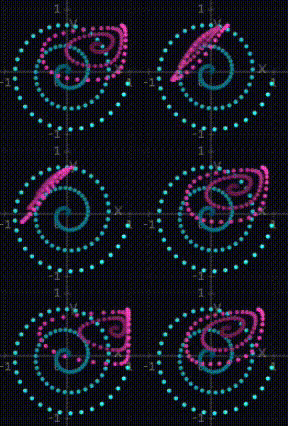
While studying Linear Algebra for Machine Learning and Data Science, I developed several tools below to help visualize key concepts.

Blog
Headcount Planner v0.3
Jan 26, 2026It’s headcount planning season again.
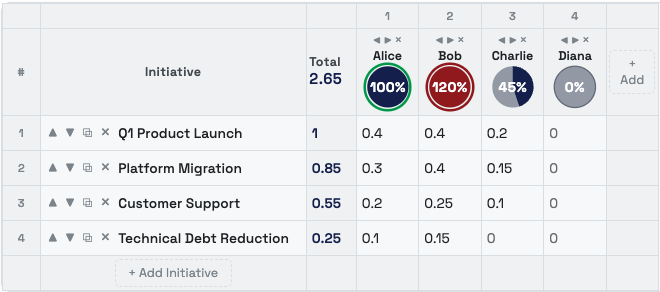
For FY27 planning, I built a lightweight headcount allocation tool with the help of Claude Opus 4.5. You enter employee names and initiatives, and the UI immediately shows under- or over-allocation.
There’s no backend, no cookies, and no stored data — everything is encoded in the URL. Share the link with your team to view the same plan, or self-host it internally.
Voice Neural Net Quiz
Jan 7, 2026When you're driving or have free time, visit voice-neural-net-quiz-v1.html and take a fully hands-free quiz using only your voice.
This is a small experiment that combines several free, in-browser technologies:
- Text-to-Speech: Uses the Web Speech API (
SpeechSynthesis) to read questions aloud—no external services required. - Voice Recognition: Uses the Web Speech API (
SpeechRecognition) to capture spoken answers in real time, entirely in the browser. - LLM Validation: Uses Puter.js to access GPT-4o-mini for free—no API key needed; just include the script and call
puter.ai.chat(). - Screen Wake Lock: Uses NoSleep.js to keep the screen on during the quiz.

Karabiner Elements Tips for macOS
Jan 6, 2026Home / End (beginning / end of line in Chrome)
In Chrome, Home/End are handled as page navigation, so they scroll instead of moving the cursor. Use a Karabiner Complex Modification to remap Home → Cmd+Left and End → Cmd+Right only when Chrome is frontmost. This makes Home/End move to the beginning/end of the current line in Confluence and other Chrome editors, while leaving other apps unchanged.
Cmd + PgUp / PgDn (previous / next tab in Chrome and iTerm2)
On macOS, PgUp/PgDn are treated as scroll events, not real keystrokes, so apps don't reliably see them for shortcuts. That's why Karabiner is required. Use a global Karabiner Complex Modification to translate PgUp/PgDn (or physical Alt+PgUp/PgDn) into Cmd+Option+Left/Right. Chrome already uses these for tab switching. In iTerm2 → Settings → Keys, explicitly bind Cmd+Option+Left/Right to "Select Previous/Next Tab" and remove conflicting defaults, so the same shortcuts work consistently in both apps.